

Scatter Chart
The scatter chart plots each row as a point in coordinate space. Unlike bar and line charts, scatter is built for coordinate plotting: you can map grouping columns to categorical axes, use solo --select for mixed or value axes, or auto-value from all-numeric columns.
Use scatter charts when individual (x, y[, z]) positions matter — latency vs. price, a 3D point cloud, or categorical x with a continuous y metric. Scatter is opt-in: add -c scatter or run vizb scatter; it is not in the default bar,line,pie bundle.
How vizb builds it
Section titled “How vizb builds it”Scatter supports three input modes. Only one applies per dataset:
| Mode | CLI | What each row becomes |
|---|---|---|
| Grouped | -g / -p |
Categorical x, optional y series, optional z depth — same dimension model as bar/line, rendered as scatter / scatter3D |
Solo --select |
--select (no -g / -r / non-default -p) |
2–3 columns assigned to x,y[,z] — value axes (all numeric) or mixed (category x + value y[,z]) |
| Auto-value | No flags (all-numeric CSV/JSON) | Auto-detected numeric columns as raw coordinates on value axes (type: "value") |
Grouped mode
Section titled “Grouped mode”Grouped scatter follows the same x/y/z dimension model as bar and line — each point is a dot instead of a bar or connected line.
Sample orders below (copy → sales.csv). Full file: examples/csv/sales.csv (10,000 rows, 2024–2025). Live: tabular-data.
order_date,region,category,product,quantity,amount
2024-01-01,Central,Hardware,Connector,16,2488.24
2024-01-02,East,Tools,Gear,42,207.08
2024-01-03,North,Mechanical,Sensor,20,3465.22
2024-01-04,West,Electronics,Valve,24,7633.44
2024-03-12,South,Industrial,Widget,31,5088.10
2024-06-18,East,Electronics,Relay,12,2214.50
2024-09-05,North,Hardware,Bolt,28,1724.27
2024-12-20,West,Tools,Gadget,19,2938.82
2025-02-08,Central,Mechanical,Valve,27,7350.26
2025-04-14,South,Electronics,Widget,41,3278.77
2025-07-22,East,Industrial,Connector,15,5093.42
2025-10-03,North,Tools,Gear,33,4102.15
2025-11-19,West,Hardware,Sensor,22,2890.40
2025-12-28,South,Mechanical,Gadget,26,611.32
| order_date | region | category | product | quantity | amount |
|---|---|---|---|---|---|
| 2024-01-01 | Central | Hardware | Connector | 16 | 2488.24 |
| 2024-01-02 | East | Tools | Gear | 42 | 207.08 |
| 2024-01-03 | North | Mechanical | Sensor | 20 | 3465.22 |
| 2024-01-04 | West | Electronics | Valve | 24 | 7633.44 |
| 2024-03-12 | South | Industrial | Widget | 31 | 5088.10 |
| 2024-06-18 | East | Electronics | Relay | 12 | 2214.50 |
| 2024-09-05 | North | Hardware | Bolt | 28 | 1724.27 |
| 2024-12-20 | West | Tools | Gadget | 19 | 2938.82 |
| 2025-02-08 | Central | Mechanical | Valve | 27 | 7350.26 |
| 2025-04-14 | South | Electronics | Widget | 41 | 3278.77 |
| 2025-07-22 | East | Industrial | Connector | 15 | 5093.42 |
| 2025-10-03 | North | Tools | Gear | 33 | 4102.15 |
| 2025-11-19 | West | Hardware | Sensor | 22 | 2890.40 |
| 2025-12-28 | South | Mechanical | Gadget | 26 | 611.32 |
1D (X axis)
Section titled “1D (X axis)”One point per X category.
Natural-language prompt after installing the vizb skill. The agent runs the CLI.
/vizb sales.csv as scatter by order_datevizb scatter sales.csv -g order_date -p x -o out.htmlPOST / on vizb serve. The API takes inlineinput, not a file path.
{ "input": "order_date,region,category,product,quantity,amount\n2024-01-01,Central,Hardware,Connector,16,2488.24\n2024-01-02,East,Tools,Gear,42,207.08\n2024-01-03,North,Mechanical,Sensor,20,3465.22\n2024-01-04,West,Electronics,Valve,24,7633.44\n2024-03-12,South,Industrial,Widget,31,5088.10\n2024-06-18,East,Electronics,Relay,12,2214.50\n2024-09-05,North,Hardware,Bolt,28,1724.27\n2024-12-20,West,Tools,Gadget,19,2938.82\n2025-02-08,Central,Mechanical,Valve,27,7350.26\n2025-04-14,South,Electronics,Widget,41,3278.77\n2025-07-22,East,Industrial,Connector,15,5093.42\n2025-10-03,North,Tools,Gear,33,4102.15\n2025-11-19,West,Hardware,Sensor,22,2890.40\n2025-12-28,South,Mechanical,Gadget,26,611.32\n", "parser": "csv", "grouping": { "columns": [ "order_date" ], "pattern": "x" }, "charts": { "types": [ "scatter" ] }, "output": { "format": "html" }}GitHub Action step. Same conversion as the CLI.
- uses: goptics/vizb@v0 with: file: sales.csv group: order_date group-pattern: x charts: scatter output-html: out.html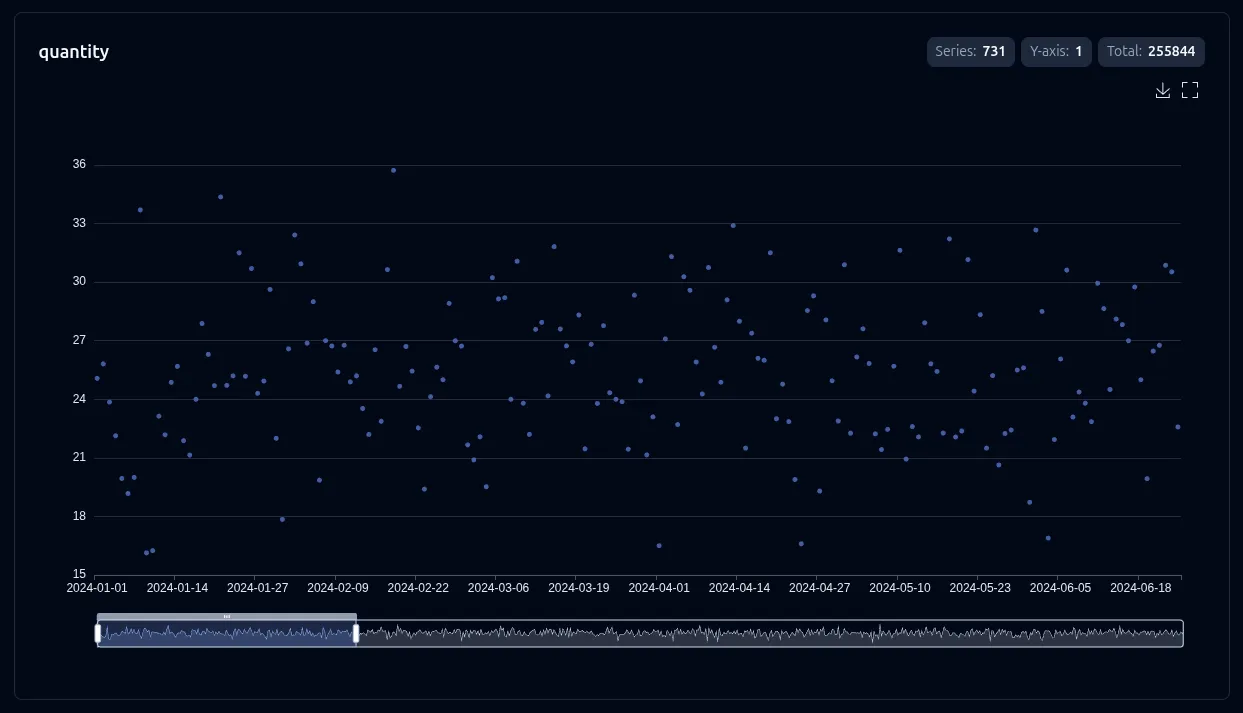
2D (X + Y axes)
Section titled “2D (X + Y axes)”One series per Y value across the X axis. Toggle series in the legend.
Natural-language prompt after installing the vizb skill. The agent runs the CLI.
/vizb sales.csv as scatter by region & categoryvizb scatter sales.csv -g region,category -p x,y -o out.htmlPOST / on vizb serve. The API takes inlineinput, not a file path.
{ "input": "order_date,region,category,product,quantity,amount\n2024-01-01,Central,Hardware,Connector,16,2488.24\n2024-01-02,East,Tools,Gear,42,207.08\n2024-01-03,North,Mechanical,Sensor,20,3465.22\n2024-01-04,West,Electronics,Valve,24,7633.44\n2024-03-12,South,Industrial,Widget,31,5088.10\n2024-06-18,East,Electronics,Relay,12,2214.50\n2024-09-05,North,Hardware,Bolt,28,1724.27\n2024-12-20,West,Tools,Gadget,19,2938.82\n2025-02-08,Central,Mechanical,Valve,27,7350.26\n2025-04-14,South,Electronics,Widget,41,3278.77\n2025-07-22,East,Industrial,Connector,15,5093.42\n2025-10-03,North,Tools,Gear,33,4102.15\n2025-11-19,West,Hardware,Sensor,22,2890.40\n2025-12-28,South,Mechanical,Gadget,26,611.32\n", "parser": "csv", "grouping": { "columns": [ "region", "category" ], "pattern": "x,y" }, "charts": { "types": [ "scatter" ] }, "output": { "format": "html" }}GitHub Action step. Same conversion as the CLI.
- uses: goptics/vizb@v0 with: file: sales.csv group: region,category group-pattern: x,y charts: scatter output-html: out.html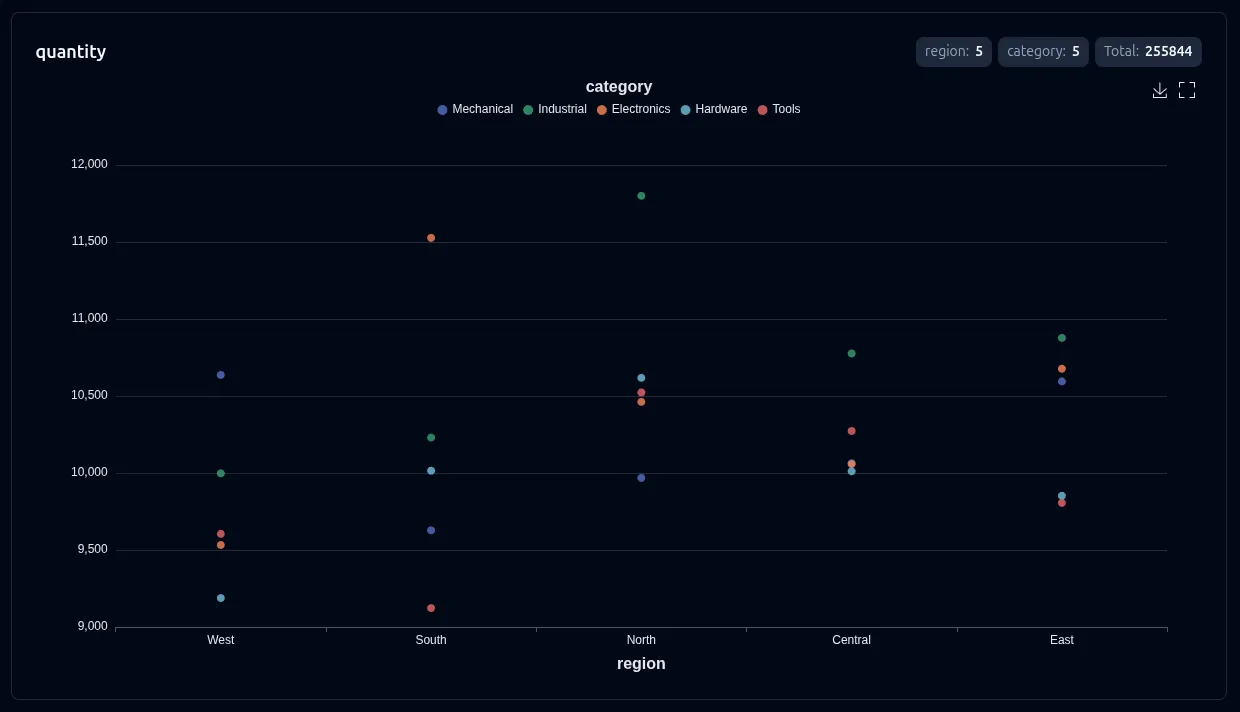
3D (X + Y + Z axes)
Section titled “3D (X + Y + Z axes)”WebGL scatter3D scene: each Z value is a separate point series across the X/Y grid. Rotate, zoom, and pan in the browser. Requires echarts-gl (bundled automatically).
Natural-language prompt after installing the vizb skill. The agent runs the CLI.
/vizb sales.csv as scatter, split order_date into month & date (skip the year), category as depthvizb scatter sales.csv -g order_date,category -p "[-y{Month}-x{Date}],z{Category}" -o out.htmlPOST / on vizb serve. The API takes inlineinput, not a file path.
{ "input": "order_date,region,category,product,quantity,amount\n2024-01-01,Central,Hardware,Connector,16,2488.24\n2024-01-02,East,Tools,Gear,42,207.08\n2024-01-03,North,Mechanical,Sensor,20,3465.22\n2024-01-04,West,Electronics,Valve,24,7633.44\n2024-03-12,South,Industrial,Widget,31,5088.10\n2024-06-18,East,Electronics,Relay,12,2214.50\n2024-09-05,North,Hardware,Bolt,28,1724.27\n2024-12-20,West,Tools,Gadget,19,2938.82\n2025-02-08,Central,Mechanical,Valve,27,7350.26\n2025-04-14,South,Electronics,Widget,41,3278.77\n2025-07-22,East,Industrial,Connector,15,5093.42\n2025-10-03,North,Tools,Gear,33,4102.15\n2025-11-19,West,Hardware,Sensor,22,2890.40\n2025-12-28,South,Mechanical,Gadget,26,611.32\n", "parser": "csv", "grouping": { "columns": [ "order_date", "category" ], "pattern": "[-y{Month}-x{Date}],z{Category}" }, "charts": { "types": [ "scatter" ] }, "output": { "format": "html" }}GitHub Action step. Same conversion as the CLI.
- uses: goptics/vizb@v0 with: file: sales.csv group: order_date,category group-pattern: "[-y{Month}-x{Date}],z{Category}" charts: scatter output-html: out.html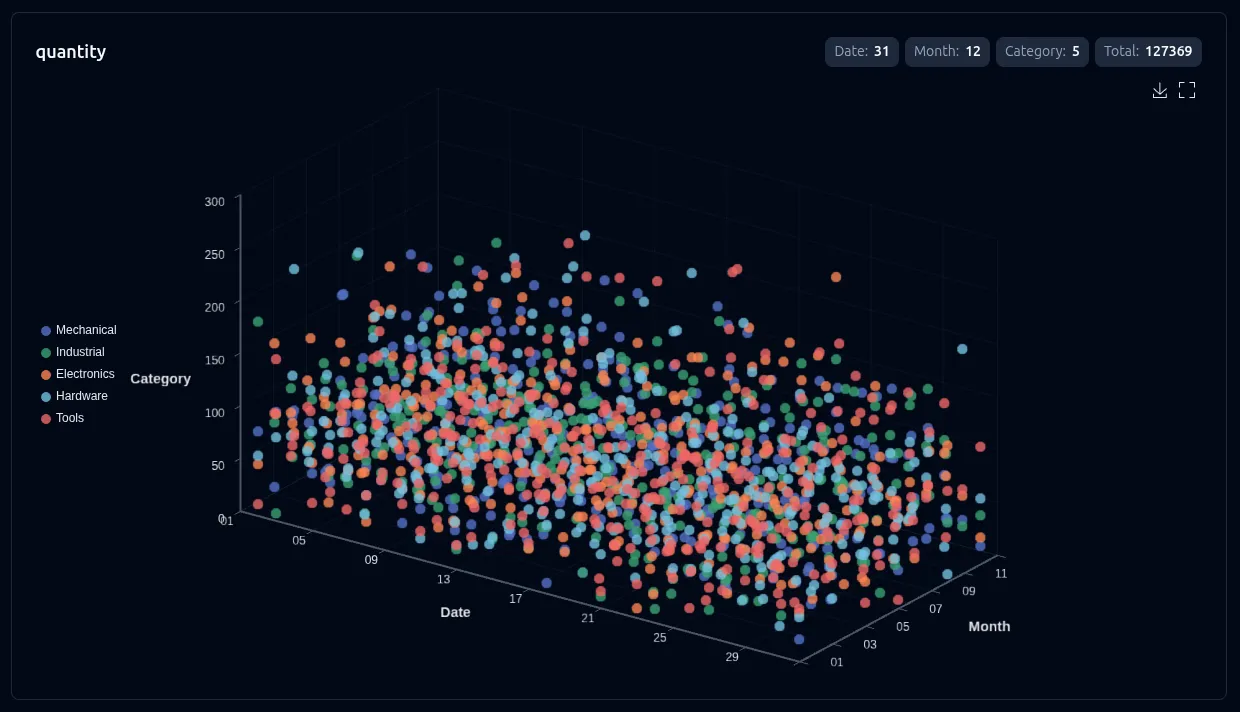
When you have only x and y grouping (no z column), pass --3d to project the same data into pseudo-3D: y categories move to depth and the metric becomes height — the same value-3D toggle bar and line use. See 3D Charts.
--select (csv/json)
Section titled “--select (csv/json)”--select is repeatable (csv/json only). With explicit -g / -p / -r it picks which numeric columns get their own chart, same as bar/line. Without group, scatter is the primary chart for solo --select coordinate plotting — its two signatures are value mode (all-numeric x,y[,z]) and mixed mode (category on x, values on y[,z]).
Mixed category × metric sample (copy → region-metrics.csv):
region,latency,sales
North,12.4,8200
South,18.1,6400
East,9.7,9100
West,14.2,7300
Central,11.0,7800
| region | latency | sales |
|---|---|---|
| North | 12.4 | 8200 |
| South | 18.1 | 6400 |
| East | 9.7 | 9100 |
| West | 14.2 | 7300 |
| Central | 11.0 | 7800 |
Natural-language prompt after installing the vizb skill. The agent runs the CLI.
/vizb region-metrics.csv as scatter, region & latencyvizb scatter region-metrics.csv --select region,latency -o mixed.htmlPOST / on vizb serve. The API takes inlineinput, not a file path.
{ "input": "region,latency,sales\nNorth,12.4,8200\nSouth,18.1,6400\nEast,9.7,9100\nWest,14.2,7300\nCentral,11.0,7800\n", "parser": "csv", "select": [ "region,latency" ], "charts": { "types": [ "scatter" ] }, "output": { "format": "html" }}GitHub Action step. Same conversion as the CLI.
- uses: goptics/vizb@v0 with: file: region-metrics.csv select: region,latency charts: scatter output-html: mixed.html# Value mode: two numeric columns → 2D scatter (repo: examples/csv/spiral-3d.csv)vizb scatter spiral-3d.csv --select x,y -o scatter.html
# Three columns → 3D mixed (category x + value y + value z)vizb scatter life-expectancy-income.csv --select Country,"Life Expectancy",Income -o mixed3d.html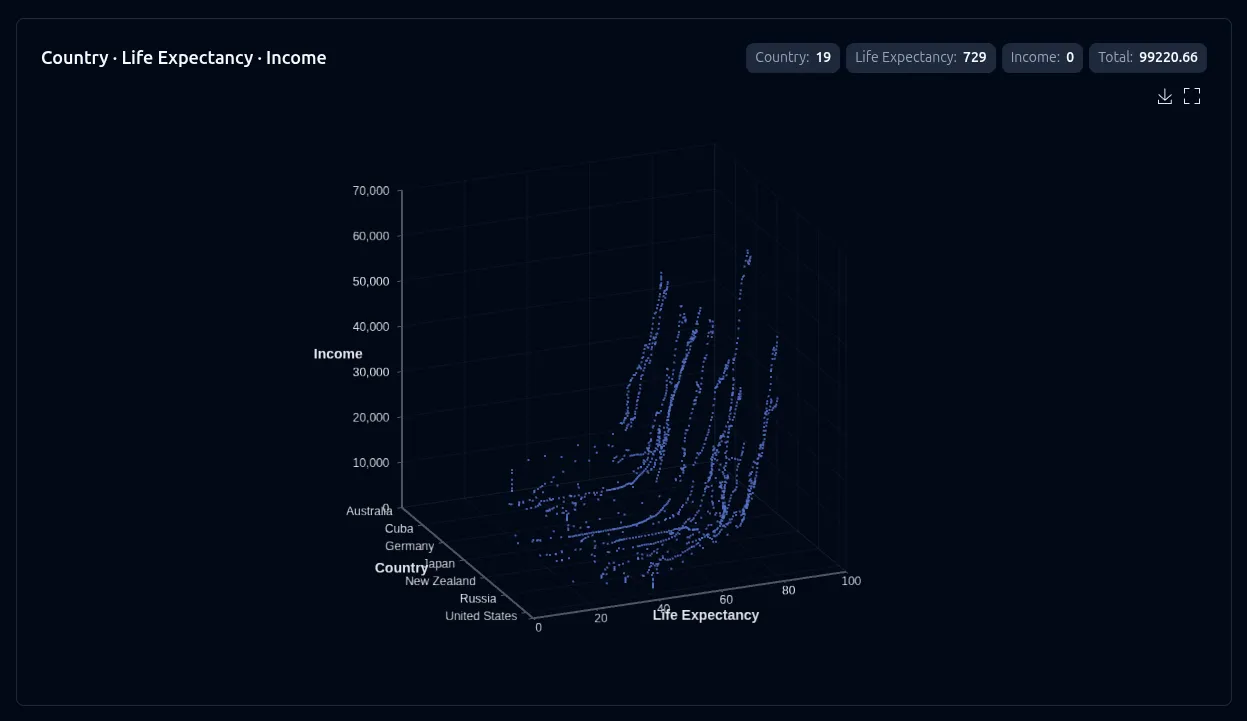
Repeat --select (dim,metric per flag) for multi-stat datasets — charts separate by stat type. This does not enable grouping; use -g/-p when you need explicit group axes or aggregation. See Select for the full mode reference, and Group vs Select for when to use each.
Auto-value mode (no flags)
Section titled “Auto-value mode (no flags)”On an all-numeric CSV/JSON file, vizb auto-detects the first 2–3 columns as coordinate axes and enters value mode automatically — with 3+ columns it renders continuous scatter3D. See Auto-value for the inference rules; solo --select overrides it.
Natural-language prompt after installing the vizb skill. The agent runs the CLI.
/vizb clusters.csv as scatter, visual map, symbol size 10vizb scatter clusters.csv --visualmap --symbol-size 10 -o scatter.htmlPOST / on vizb serve. The API takes inlineinput, not a file path.
{ "input": "<contents of clusters.csv>", "parser": "csv", "charts": { "types": [ "scatter" ], "configs": [ { "type": "scatter", "visualMap": true, "symbolSize": 10 } ] }, "output": { "format": "html" }}GitHub Action step. Same conversion as the CLI.
- uses: goptics/vizb@v0 with: file: clusters.csv charts: scatter chart: "scatter:visualmap;symbol-size=10" output-html: scatter.html# Three columns — auto-detects x, y, z and enables 3Dvizb scatter spiral-3d.csv -o scatter.html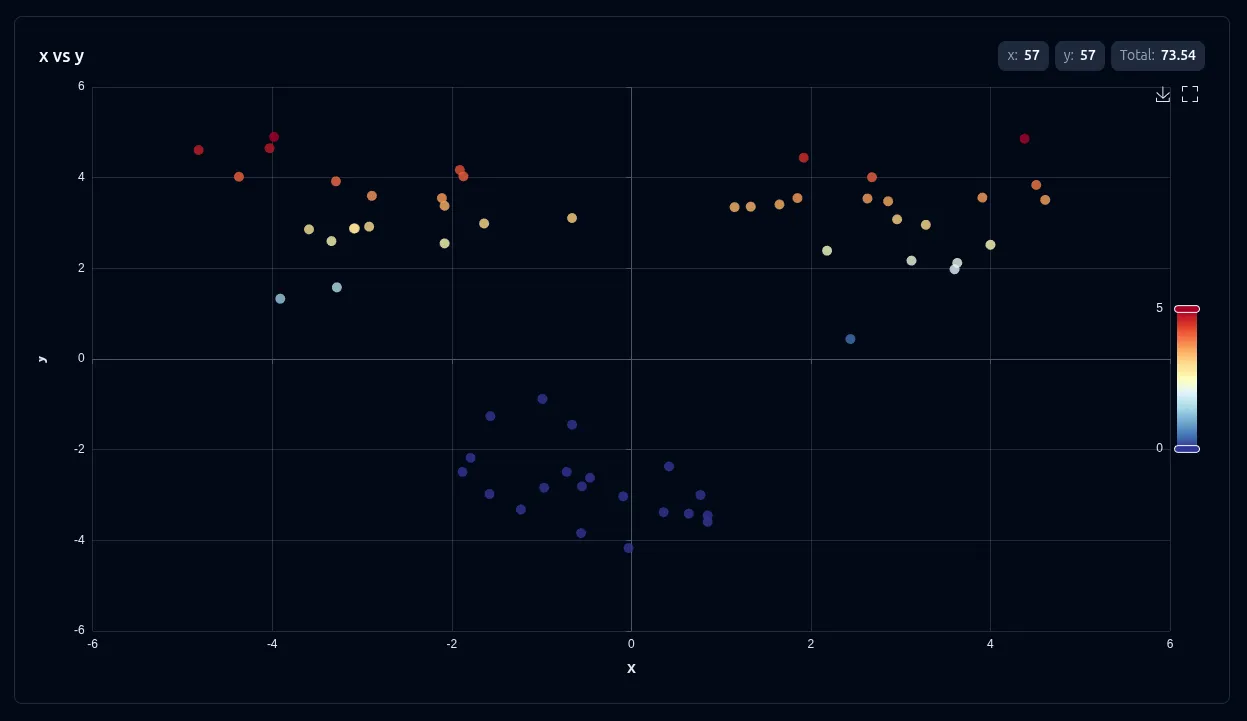
Use the axis swapper in the UI to include or drop z and toggle between 2D and 3D without re-running the CLI.
Settings
Section titled “Settings”These settings apply to scatter charts:
| Setting | CLI flag | UI toggle | Notes |
|---|---|---|---|
| Sort | --sort asc|desc |
Sort control | Grouped mode only — hidden for auto-value and mixed |
| Labels | --show-labels |
Show labels | Point labels where supported |
| Swap | --swap |
Axis switcher | Grouped mode; auto-value with 3 columns |
| Scale (log) | --scale log or --scale 'type=log;axes=x' |
Scale toggle | linear / log (value axis), or bag for per-axis log — 2D grouped, value, and mixed mode |
| 3D view | --3d |
3D view | Pseudo-3D for grouped x+y (no z column) |
| 3D visual map | --3d-visualmap |
3D visual map | Metric gradient on 3D points |
| 2D visual map | --visualmap |
Visual map | Gradient coloring on 2D scatter — off by default |
| Symbol | --symbol |
Symbol | ECharts marker shape — circle, diamond, pin, arrow, none, … |
| Symbol size | --symbol-size |
Symbol size | Point diameter in pixels |
| Auto-rotate | --3d-rotate |
Auto rotate | Spins the 3D scene — 3D only |
Override settings for just this chart type:
# Log scale and labels on a grouped scattervizb scatter data.csv -g category,metric --scale log -l -o out.html
# Per-axis log bag (unwrapped; no braces on --scale)vizb scatter data.csv --scale 'type=log;axes=x' -o out.html
# Mixed region vs latency with log yvizb scatter region-metrics.csv --select region,latency --scale log -o out.html
# Cluster scatter with visualMap and diamond markersvizb scatter clusters.csv --visualmap --symbol diamond --symbol-size 10 -o out.html
# 3D spiral with auto-rotatevizb scatter spiral.csv -o out.html  # auto-value x,y,z → 3D